Rhythms:
All rhythms are included in both the free and deluxe versions.
Level 1:


Level 2:


Level 3:


Level 4:


Level 5:


Level 1:


Level 2:


Level 3:


Level 4:


Custom levels are great if you want to practice sprcific rhythms. This feature is available in the Deluxe version. Click on the settings icon ( ) and under 'Music Settings' choose 'Custom' level.
Next, navigate to the 'custom level' tab and select the rhythms that you want to practice.
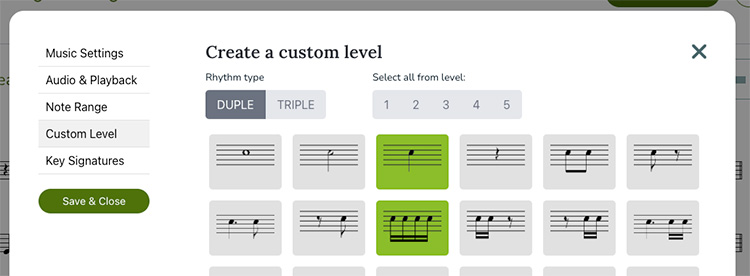
Clicking on the level buttons on the top right will select the beats from that level.
Audio questions:
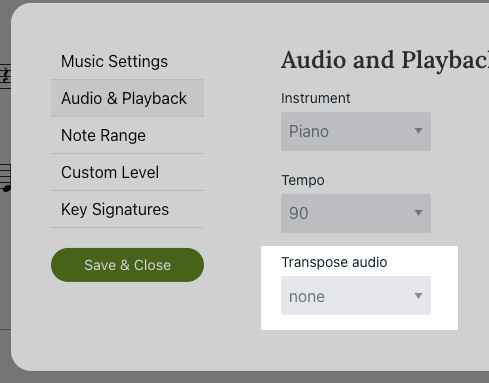
This is probably due to a transposing error. The audio files that are created are in the key of C, so instruments such as flute and piano can play without needing the audio transposed. Clarinets, saxophones, trumpets and many other instruments do not play in the key of C and need the audio transposed.
No, the audio player is the same for both the basic and the deluxe versions.
Misc questions:
In 2022 PracticeSightReading got a new design and interface. As part of this upgrade users will need to signup for an account to practice. Users whishing to continue practicing rhythm can do so without paying. The free version is staying free!. If you want to support the site and practice with melodies, please consider signing up for the deluxe plan.
PracticeSightReading.com works in all modern browsers. JavaScript and Cookies must be turned on to save settings and log in.
Infinite Loop Error or Overflow limit usually happens when creating custom levels when there aren't the correct notes selected. For example, if you are in 2/4 time and only have whole notes selected. This pattern is impossible and as a result the Infinite Loop Error is triggered. To fix this error, choose different notes in the custom level section.